
Attention: Our phone systems are currently down. We apologize for any inconvenience this may cause.
Inkjet printing temperature and humidity graphic

Inkjet Printing: Why Temperature and Humidity Matter

For UK businesses using industrial inkjet printers—whether Direct-to-Garment (DTG), Direct-to-Film (DTF), eco-solvent large-format, or UV printers—maintaining the right temperature and humidity is essential. Environmental conditions directly influence print quality, equipment reliability, and operational costs.

Why Environmental Control Matters

The Science Behind Inkjet Printing

Inkjet printing relies on the precise delivery of ink droplets. Two key factors—surface tension and viscosity—determine how ink behaves as it travels from the printhead to the substrate. Both are highly sensitive to changes in temperature and humidity:
  • Surface Tension: Affects droplet formation and spread. Too high or too low, and you’ll see splatter, streaks, or poor adhesion.
  • Viscosity: Influences how smoothly ink flows. If it’s off, you risk clogs, inconsistent colour, or wasted materials.
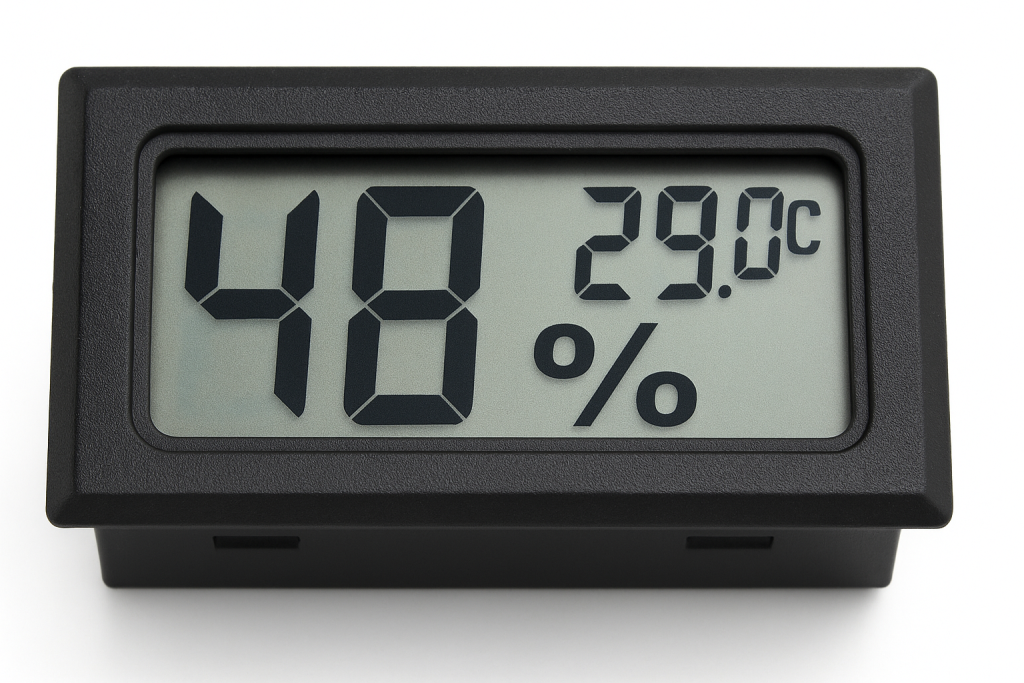
Humidity gauge for inkjet printing conditions

How Temperature and Humidity Affect Printing

  • High humidity can cause ink to dry too slowly, leading to smudging and colour bleed.
  • Low humidity increases static, which can misdirect droplets and cause substrate warping.
  • High temperatures thin the ink, risking leaks and streaks.
  • Low temperatures can make ink too thick, leading to nozzle blockages.

Consequences of Poor Temperature and Humidity Control on Equipment

Controlling temperature and humidity isn’t just about print quality, it’s vital for protecting your equipment and ensuring reliable, cost-effective operation.

Failing to maintain optimal environmental conditions can lead to a range of mechanical and electrical issues, increased maintenance, and even premature equipment failure.

1. Increased Wear and Tear

  • Low humidity dries out lubricants on moving parts such as rollers, belts, and gears, increasing friction and accelerating wear. This results in more frequent breakdowns and a shorter lifespan for critical components6.
  • High humidity can cause metal parts to corrode or rust, especially in areas with poor airflow, leading to costly repairs and replacements3.

2. Electrical and Electronic Failures

  • Static electricity builds up in low humidity environments, which can discharge into sensitive electronic components, causing malfunctions, sensor errors, or even permanent damage to circuit boards and control systems63.
  • Moisture ingress in high humidity can lead to short circuits, corrosion of connectors, and erratic equipment behaviour, increasing the risk of unexpected downtime.

3. Mechanical Malfunctions and Downtime

  • Paper and substrate jams: Warped, curled, or wavy media caused by humidity extremes can jam feeding mechanisms, leading to production stoppages and increased operator intervention.
  • Nozzle and printhead issues: Temperature swings can cause ink to thicken (clogging nozzles) or thin (causing leaks and over-jetting), both of which can damage printheads and require costly servicing or replacement.
  • Dust accumulation: Low humidity increases airborne dust, which settles on mechanical and electronic parts, clogging components and interfering with sensors6.

4. Increased Maintenance and Operating Costs

  • Frequent cleaning and servicing: Equipment exposed to improper environmental conditions will require more frequent maintenance, cleaning, and calibration to keep running smoothly.
  • Unplanned downtime: Mechanical and electrical failures due to poor temperature and humidity control can halt production, delay deliveries, and increase labour costs for emergency repairs.

Stories from the Field: A Cautionary Tale

One of our engineers recently visited a customer struggling with their UV printer—after the machine suddenly stopped jetting cyan ink.

The room’s temperature and humidity were far from ideal: the space measured 29°C with 48% humidity, but uneven cooling meant one side of the room sat at 24.5°C thanks to direct air conditioning, while the other side lingered at 26–28°C.

This inconsistent environment caused the printhead to alternate between warm and cool spots, preventing stable ink delivery.

Despite the customer’s best efforts, the head simply wouldn’t jet properly until the room was cooled evenly and airflow directed away from the printer.

It was a stark reminder that even small variations in temperature and humidity can lead to major print failures—and costly downtime.

Summary Table: Equipment Consequences

Maintaining stable temperature and humidity is essential not only for print quality, but also for maximising equipment uptime, reducing repair costs, and extending the service life of your investment

Recommended Temperature and Humidity Ranges by Printer Type

Recognising the Warning Signs of Environmental Issues

General symptoms of poor environmental control:

  • Static electricity (often in low humidity)
  • Ink viscosity changes (temperature swings)
  • Material warping (humidity swings)
  • Nozzle clogging (rapid drying or thickening)

Recognising Symptoms of Poor Environmental Control

Practical Mitigation Strategies

1. Environmental Controls

  • Install HVAC systems: Maintain stable temperature and humidity year-round.
  • Use humidifiers or dehumidifiers: Particularly important in the UK’s variable climate.
  • Monitor with sensors: Place digital hygrometers and thermostats near printers for real-time data.

2. Ink and Material Management

  • Keep ink sealed: When using bottled or bulk ink, keeping it covered/capped at all times prevents evaporation and contamination.
  • Store materials properly: Use sealed, climate-controlled storage for films, substrates, and powders.
  • Allow materials to acclimatise before printing: Let films, fabrics, or substrates adjust to room conditions to avoid warping or moisture-related defects.

3. Equipment Maintenance and Operation

  • Regularly clean printheads and nozzles: Prevent clogs caused by ink drying or thickening due to environmental fluctuations.
  • Calibrate printers frequently: Compensate for minor environmental changes to maintain consistent droplet size and placement.
  • Avoid placing printers near windows, doors, or heat sources: Protect equipment from drafts, direct sunlight, or temperature spikes that can affect ink behaviour.

Best Practice Checklist

Check and record temperature and humidity levels daily.

Maintain temperature and humidity within printer-specific recommended ranges.

Store all consumables in sealed, climate-controlled environments.

Clean printheads weekly and calibrate machines monthly.

Train operators to understand the importance of environmental control and how to respond to issues.

Conclusion

Precise temperature and humidity control IS fundamental to achieving consistent, high-quality results with industrial inkjet printers.

Want to make certain that you’re giving your printer and your business the best chance of success? See below:

Keep Your Equipment Running at Its Best — Register Your Operators Today

Fluctuating temperature and humidity can harm print quality and shorten the life of your equipment. Make sure your operators have the maintenance tips, reminders, and expert support they need to prevent costly downtime.

Register your operators now — it only takes a few minutes.

By understanding the environmental needs of each printer type and implementing robust monitoring and mitigation strategies, UK businesses can reduce print defects, minimise downtime, and extend equipment life—regardless of the variable British climate.

keep learning!