

The goal for any t-shirt printer is to provide an end product that looks great, feels great, and lasts a long time. Because if you do that, you know your customers are more likely to come back again and again. That’s why it’s so surprising that most printing businesses don’t take advantage of this technique that contributes so much to look, feel, and longevity… and that also improves your profits on every print.
That technique or software feature is typically called Knock Out Colour.
And as the name implies, it allows you to selectively remove colours from any design. Just removing the shirt colour from your design means you use less ink and lighten the feel of a printed design.
However, while colour removal in DTF printingloffers significant advantages, it also comes with challenges that garment printers must consider. In this article, we’ll explore the pros and cons of colour removal in DTF printing and share best practices for achieving the best results.
The simple explanation is just as you’d think. You choose a colour in your design to remove.
A common application would be to remove the colour of the shirt itself from the design. So, if you were applying your DTF transfer to a black shirt you would remove black from the design to let the shirt colour show through.
In that example if also gives the end result a more natural look because the colour value of “black” in your design will certainly look different that the black of the shirt, which may not fit with your design aesthetic.
DTF RIP software programs like Acrorip, Cadlink, Print Optimizer, and EKPrint allow you to knock out specific colours from any design.
Removal even includes White Ink Underbase Adjustments. DTF printers use white ink as a base to keep colours vibrant on dark fabrics, but depending on the colour of the shirt, you can save ink and improve the feel by reducing the amount.
But that doesn’t mean there aren’t potential downsides to the process…
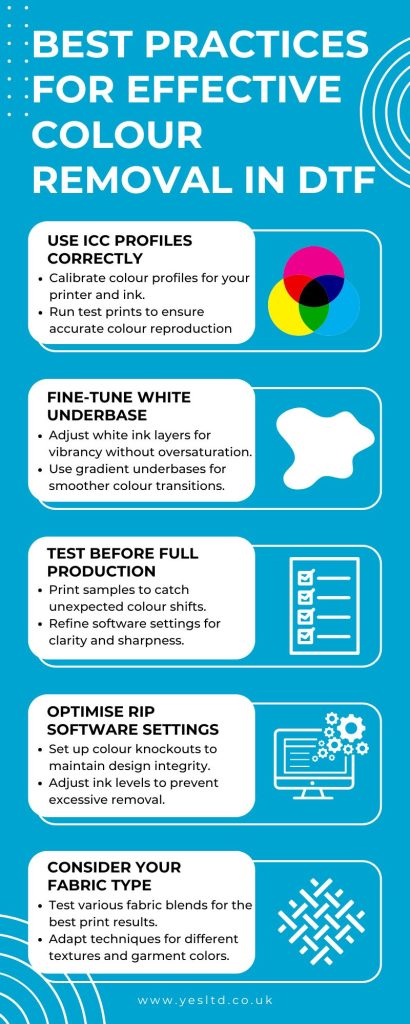
Using colour removal in DTF printing can lead to lower ink costs, better print quality, and longer-lasting designs. But it’s not a one-size-fits-all solution. Potential challenges like colour mismatches, software complexities, and fabric variations mean it’s crucial to test, tweak, and optimise your process.
The best approach? Find the right balance between efficiency and print quality. With the right ICC profiling, software settings, and test prints, you can make the most of colour removal: boosting both your print results and your bottom line.
Want to see how it works in action? Try it out on a sample print today and fine-tune your settings for maximum impact! If you are looking at moving into DTF printing, our experts can help you today.
